
Introduction
I didn’t start testing Seedr.cc because I was hunting for a shiny new toy. It was more out of mild frustration than curiosity. My home internet is fast enough on paper, but torrent downloads have always been unpredictable—sometimes they crawl, sometimes they spike, and occasionally my ISP seems to lose patience altogether. On top of that, I do a lot of my downloading on a laptop with limited storage, and juggling half-finished files isn’t exactly fun. Somewhere in the middle of all that, Seedr popped up in a conversation as a “cloud torrent thing that actually works.”
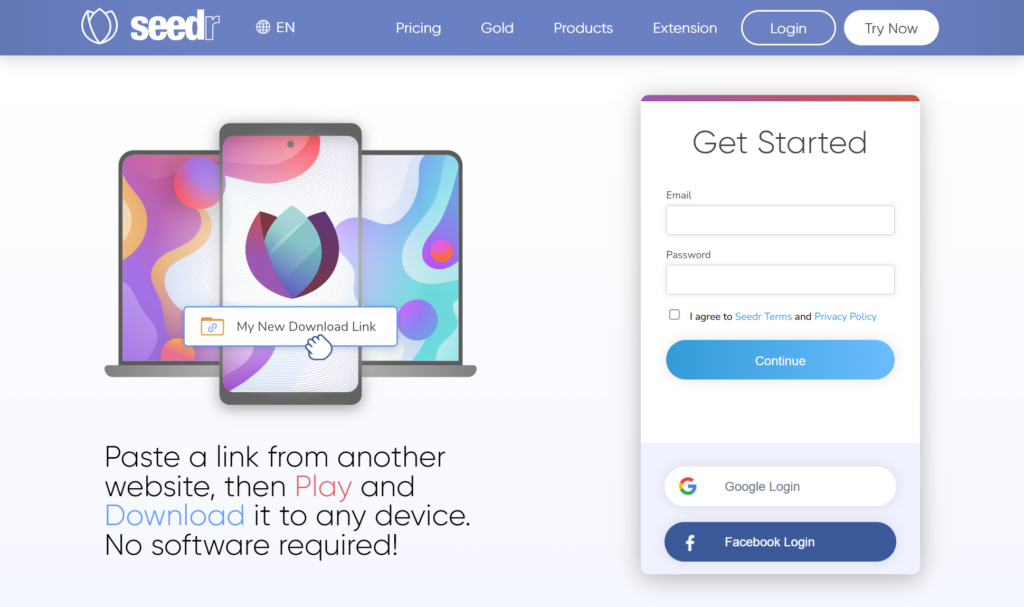
Seedr.cc, at its core, is a cloud-based torrent downloader. Instead of running a torrent client on your own machine, you paste a magnet link or upload a .torrent file to Seedr, and their servers handle the downloading. Once the file is ready, you either stream it directly in your browser or download it as a regular file. That’s the elevator pitch, and I was skeptical. I’ve tried similar services before, and they either felt painfully slow, aggressively limited, or just plain unreliable.
What pushed me to give Seedr a proper test was the promise of convenience more than speed. The idea of adding a torrent from my phone, letting it finish in the background, and then grabbing the file later from any device sounded… nice. Almost too nice. So I signed up, started with the free tier, and then upgraded partway through my testing to see where the real differences were.
I didn’t go easy on it either. Over a few weeks, I threw different kinds of files at Seedr: Linux ISOs, public-domain movies, some large open-source archives, and a handful of creative commons video files. Some were small, some pushed past 10GB. What I found wasn’t perfect, but it was more interesting—and more usable—than I expected.
How It Works (In Practice)
Using Seedr feels less like setting up a torrent client and more like dropping files into a cloud drive that happens to understand magnet links. After creating an account, you’re greeted by a web interface that’s clean without being flashy. There’s a big plus button where you can paste a magnet link or upload a torrent file, and that’s basically the start of everything.
Once you add a torrent, Seedr’s servers take over. There’s no need to keep your browser open; you can close the tab, come back later, and check on progress. That alone changes how you think about torrenting. Instead of babysitting downloads, you treat them more like background tasks. When I added a 4.7GB Linux ISO, it showed up in the queue almost instantly, and within a minute or two it had already grabbed a noticeable chunk of the file.
What’s different from a traditional client is that you’re not seeding or downloading from your own connection. Everything happens server-side. From your ISP’s perspective, you’re just accessing a website and downloading a regular file later. That doesn’t make you invisible or magically anonymous, but it does shift where the heavy lifting happens.
Accessing the files afterward is straightforward. Completed torrents appear as folders in your Seedr storage. You can click into them, stream video files directly in the browser, or download individual files or entire folders as ZIPs. I mostly stuck with direct downloads rather than ZIPs, since zipping large folders can take a bit of extra time.
The website is mobile resposive too, though I spent most of my time in the browser. The mobile experience mirrors the web interface closely, which is good for consistency but also means some UI quirks carry over. Still, adding a torrent from my phone while commuting and checking on it later from my laptop worked exactly as advertised.
Key Features & Performance
Download Speeds and Reliability
This was the big question mark going in. Cloud torrent services live or die by how fast and consistent they are, and Seedr didn’t embarrass itself here. On the free tier, I saw download speeds that hovered around 5–10 MB/s for well-seeded torrents. Smaller files—say, a 700MB public-domain film—often finished in under two minutes. Larger ones took longer, obviously, but progress felt steady rather than erratic.
When I upgraded to a paid plan, speeds jumped noticeably. For popular torrents with lots of peers, I was seeing bursts closer to 20–30 MB/s. Not constantly, but often enough that a 10GB file didn’t feel like an overnight affair. Less popular torrents slowed things down, though, and Seedr doesn’t perform miracles. If a torrent has three peers and one of them is barely online, you’ll feel that.
Reliability was solid overall. I didn’t have any downloads fail outright, though a couple stalled temporarily before resuming later. That’s not unusual in torrenting, and Seedr handled it about as well as a desktop client would.
Storage Options: Free vs Paid
The free tier is usable, but it’s tight. You get a small amount of storage—enough for one medium-sized file or a handful of smaller ones. I constantly found myself deleting files to make room for new tests. That’s clearly intentional. Seedr wants free users to taste the service, not live on it.
Paid storage is where the service starts to make sense for regular use. Once upgraded, I stopped thinking about space every five minutes. Being able to keep multiple multi-gigabyte files around without juggling them felt liberating, especially since everything lived in the cloud until I actually needed it.
One thing I appreciated was how transparent storage usage was. You can see exactly what’s taking up space, and deleting files immediately frees it up. No waiting, no weird caching delays.
Streaming Capability
Streaming is one of Seedr’s headline features, and it mostly delivers. I tested it with several video files, including a 1080p creative commons documentary and a 4K nature video that clocked in at around 12GB. The 1080p files streamed smoothly with almost no buffering once playback started. Initial load times were usually a few seconds.

The 4K file was more hit-or-miss. On a stable connection, it played fine after a longer initial buffer, but scrubbing through the timeline caused pauses. That’s not shocking—streaming high-bitrate 4K through a browser isn’t trivial—but it’s worth knowing if that’s your main use case.

Audio files streamed instantly, and subtitles embedded in video files were recognized without fuss. I didn’t test external subtitle uploads extensively, so I can’t say how well that works.
File Management
File management in Seedr is simple, maybe a bit too simple for power users. You can rename files, delete them, and move them between folders. There’s no deep tagging or advanced sorting, but I didn’t really miss it. For a service that’s primarily about getting files in and out, it’s adequate.

One minor annoyance: the delete button placement. It’s easy to misclick when you’re moving quickly, especially on mobile. I accidentally deleted a folder once and had to re-download it. Not the end of the world, but still.
Downloading files to your device is straightforward. Direct downloads are fast and stable, and I didn’t experience corrupted files. ZIP downloads worked too, though they added an extra processing step that sometimes took longer than expected for large folders.
Privacy and Security
Seedr uses HTTPS, and your files aren’t publicly accessible unless you share them. From what I could tell, there’s no obvious logging interface that shows peer IPs or anything like that. That said, Seedr isn’t a VPN or a privacy shield. You’re trusting a third party to handle your torrents, and that comes with trade-offs.
I stuck to legitimate use cases—Linux distributions, public-domain media, authorized content—and that’s clearly what the service is designed to support. If you’re expecting airtight anonymity, you’ll probably want additional tools.
Cross-Platform Access
This is where Seedr quietly shines. Browser access works everywhere. The mobile website is competent and let you add torrents, stream files, and manage storage without much friction. I liked being able to start something on my phone and finish it on my desktop later.
There’s no desktop app, but I didn’t miss it. The web interface does the job, and avoiding extra software is kind of the point here.
Extras That Actually Matter
A couple of features surprised me. RSS feed support, for example, is genuinely useful if you follow regularly updated torrents like Linux nightly builds. Set it up once, and new files just appear in your storage when they’re released.
Playlist creation for media files was another small but nice touch. It’s not Plex, but it made streaming multiple episodes or videos less annoying.
Pricing & Plans
Seedr’s pricing sits in that middle ground where it’s not dirt cheap, but it’s also not outrageous. The free tier is intentionally limited: small storage, some bandwidth caps, and occasional reminders that upgrading exists. It’s enough to see how the service works, not enough to rely on it long-term.
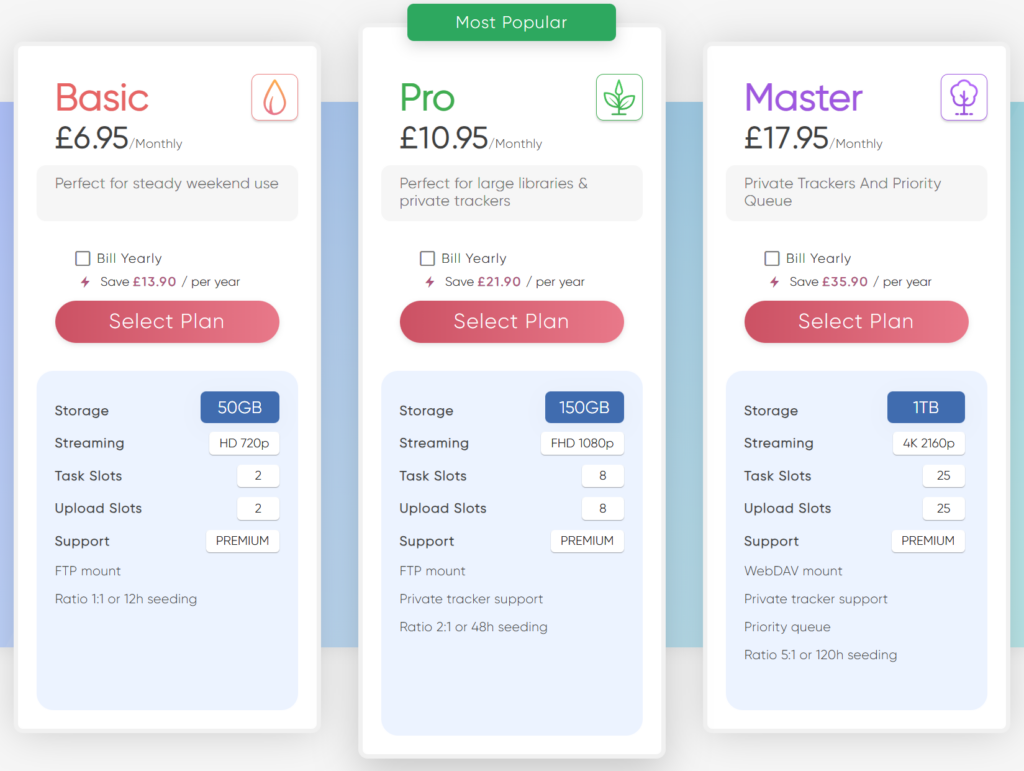
Paid plans scale mainly by storage size and bandwidth allowances. During my testing, I opted for a mid-tier plan, which felt like the sweet spot. It gave me enough room to keep several large files around and enough bandwidth that I didn’t worry about hitting limits every day.
Is it worth paying for? That depends entirely on how often you use it. If you only download the occasional Linux ISO once a month, the free tier might be fine with some patience. If you’re regularly grabbing large files or want the convenience of cloud-based downloading and streaming, the paid plans start to make sense quickly.
There are some GOLD plans that seedr newly introduced. You can try it depending on your need.

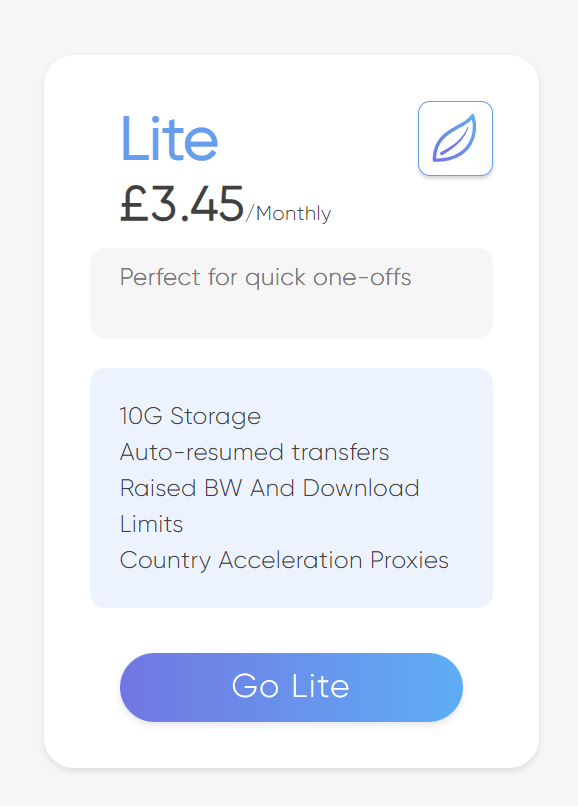
And if you are looking something small, there is 10GB Lite plan which cost £3.45 ($4.63 approx.) a month (Dec 2025). Give it a try.
Pros and Cons (From Real Use)
What Seedr does exceptionally well is convenience. Offloading torrent downloads to the cloud changes the experience more than I expected. My devices stayed free, my connection felt less stressed, and I didn’t have to keep anything running in the background. For mobile-heavy users, that’s huge.
Performance was better than I anticipated, especially on paid plans. Speeds were consistent, and downloads finished reliably. Streaming worked well for most content, and being able to preview files before downloading saved time and storage.
On the flip side, Seedr isn’t for everyone. The free tier feels cramped, and heavy users will almost certainly need to pay. File management is basic, and power users might miss advanced controls. The UI, while clean, has a few awkward spots that could use refinement.
One unexpected benefit was how it changed my habits. I stopped hoarding files locally and became more selective about what I downloaded. That alone made the service feel more valuable than just “a torrent downloader in the cloud.”
Comparison Context
Compared to traditional torrent clients, Seedr trades control for convenience. You lose granular settings and seeding control, but you gain flexibility and portability. Against other cloud torrent services, it sits comfortably in the upper middle—more polished than some, less feature-heavy than others.
I’d recommend it most to people who download on multiple devices, especially mobile users, or anyone with limited local storage. Beginners who don’t want to mess with port forwarding and client settings will also feel at home.
I wouldn’t recommend it to hardcore torrent enthusiasts who enjoy tweaking every parameter or need complete control over their setup. And if privacy is your top concern, Seedr alone probably won’t check all your boxes.
Final Thoughts
After a few weeks with Seedr.cc, I didn’t feel like I was using a gimmick. It’s a practical tool that solves specific problems: unreliable local downloads, limited storage, and the hassle of managing torrents across devices. It’s not perfect, and it doesn’t pretend to be everything for everyone, but what it does, it does competently.
If you’re curious, the free tier is worth a spin just to see how the workflow feels. For regular use, though, the paid plans are where Seedr really makes sense. I’ll probably keep using it for large, legitimate downloads and media streaming when convenience matters more than control.
Long term, services like this make me wonder how torrenting will continue to evolve. Moving the heavy lifting to the cloud isn’t a bad direction—especially when it’s done with this level of polish.